Find the side of a right triangle
 Homi
Homi
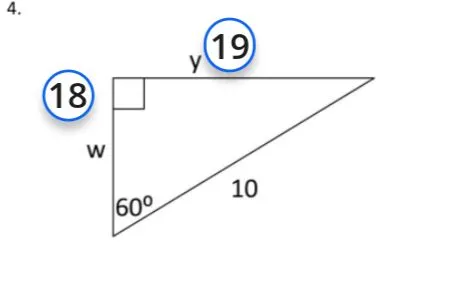
Okay, I will help you solve the problem. Based on the image, it looks like we need to find the values of w and y in the right triangle.
Task 18
We are given a right triangle with one angle of 60 degrees and the hypotenuse equal to 10. We need to find the length of the side w, which is opposite to the 60-degree angle.
We can use the sine function to relate the angle, the opposite side, and the hypotenuse:
\(\sin(\theta) = \frac{\text{opposite}}{\text{hypotenuse}}\)
In this case, \(\theta = 60^\circ\), the opposite side is w, and the hypotenuse is 10. So we have:
\(\sin(60^\circ) = \frac{w}{10}\)
We know that \(\sin(60^\circ) = \frac{\sqrt{3}}{2}\). Therefore:
\(\frac{\sqrt{3}}{2} = \frac{w}{10}\)
To solve for w, we multiply both sides by 10:
\(w = 10 \cdot \frac{\sqrt{3}}{2} = 5\sqrt{3}\)
So, \(w = 5\sqrt{3}\).
Answer: \(w = 5\sqrt{3}\)
Task 19
Now we need to find the length of the side y, which is adjacent to the 60-degree angle.
We can use the cosine function to relate the angle, the adjacent side, and the hypotenuse:
\(\cos(\theta) = \frac{\text{adjacent}}{\text{hypotenuse}}\)
In this case, \(\theta = 60^\circ\), the adjacent side is y, and the hypotenuse is 10. So we have:
\(\cos(60^\circ) = \frac{y}{10}\)
We know that \(\cos(60^\circ) = \frac{1}{2}\). Therefore:
\(\frac{1}{2} = \frac{y}{10}\)
To solve for y, we multiply both sides by 10:
\(y = 10 \cdot \frac{1}{2} = 5\)
So, \(y = 5\).
Answer: \(y = 5\)
Homi
Okay, I see that you're asking about the value of y in the given right triangle.
Task 19
As I calculated before, the length of the side y, which is adjacent to the 60-degree angle, is found using the cosine function:
\(\cos(\theta) = \frac{\text{adjacent}}{\text{hypotenuse}}\)
In this case, \(\theta = 60^\circ\), the adjacent side is y, and the hypotenuse is 10. So we have:
\(\cos(60^\circ) = \frac{y}{10}\)
Since \(\cos(60^\circ) = \frac{1}{2}\), we have:
\(\frac{1}{2} = \frac{y}{10}\)
To solve for y, we multiply both sides by 10:
\(y = 10 \cdot \frac{1}{2} = 5\)
So, \(y = 5\).
Answer: \(y = 5\)
Homi