Present Continuous Exercises in Spanish
 Homi
Homi
¡Hola! Claro, vamos a resolver los ejercicios de la imagen paso a paso.
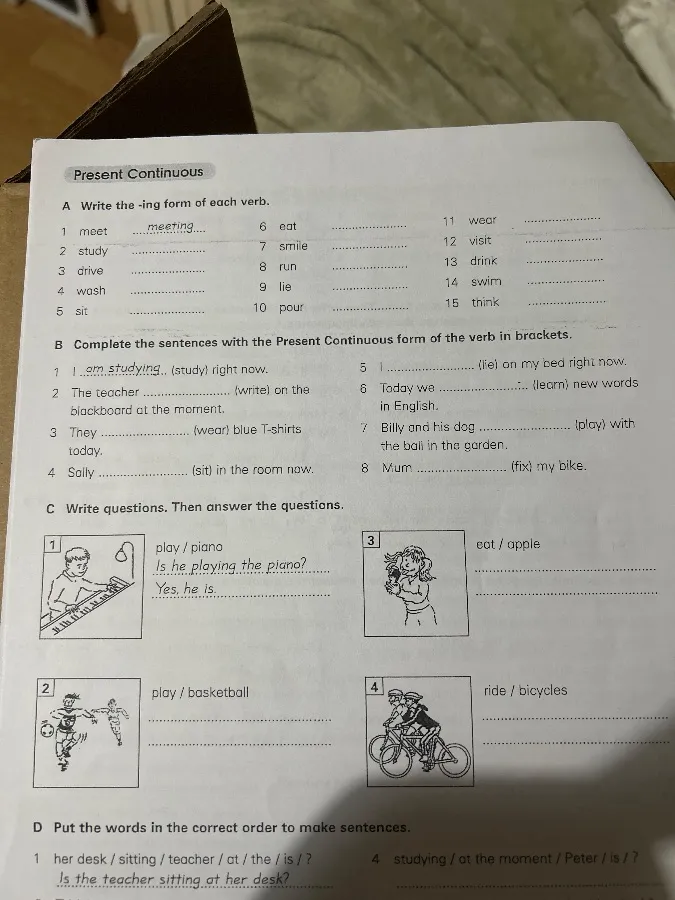
Задание A
Escribe la forma -ing de cada verbo.
- meet - meeting
- study - studying
- drive - driving
- wash - washing
- sit - sitting
- eat - eating
- smile - smiling
- run - running
- lie - lying
- pour - pouring
- wear - wearing
- visit - visiting
- drink - drinking
- swim - swimming
- think - thinking
Задание B
Completa las oraciones con la forma Present Continuous del verbo entre paréntesis.
- I am studying (study) right now.
- The teacher is writing (write) on the blackboard at the moment.
- They are wearing (wear) blue T-shirts today.
- Sally is sitting (sit) in the room now.
- I am lying (lie) on my bed right now.
- Today we are learning (learn) new words in English.
- Billy and his dog are playing (play) with the ball in the garden.
- Mum is fixing (fix) my bike.
Задание C
Escribe preguntas. Luego responde las preguntas.
-
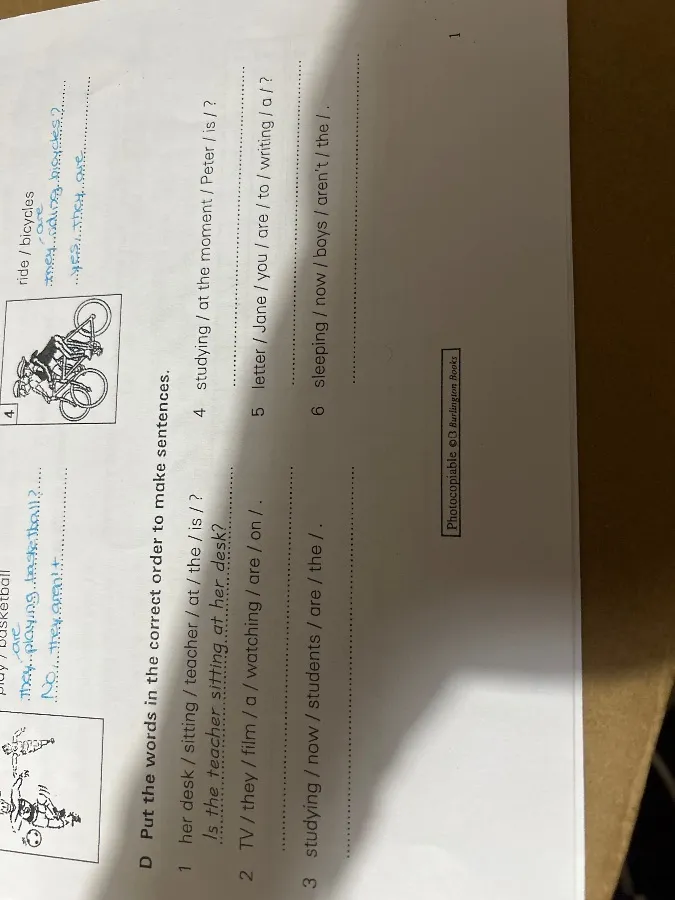
play / basketball
Is he playing basketball?
No, he isn't. (o No, they aren't. si te refieres a ambos jugadores)
3. eat / appleIs she eating an apple?
Yes, she is.
4. ride / bicyclesAre they riding bicycles?
Yes, they are.
Задание D
Pon las palabras en el orden correcto para hacer oraciones.
-
Is / the / teacher / at / sitting / her / desk /?
Is the teacher sitting at her desk?
3. studying / at / the / moment / Peter / is /?Is Peter studying at the moment?
 Homi
Homi
¡Hola! Aquí están las soluciones a los ejercicios que proporcionaste:
Задание D (продолжение)
-
TV / they / film / a / watching / are / on /.
Are they watching a film on TV?
4. studying / now / students / are / the /.Are the students studying now?
5. letter / Jane / you / are / to / writing / a /?Are you writing a letter to Jane?
6. sleeping / now / boys / aren't / the /.The boys aren't sleeping now.
 Homi
Homi
¡Hola! Claro, vamos a continuar resolviendo los ejercicios de la imagen paso a paso.
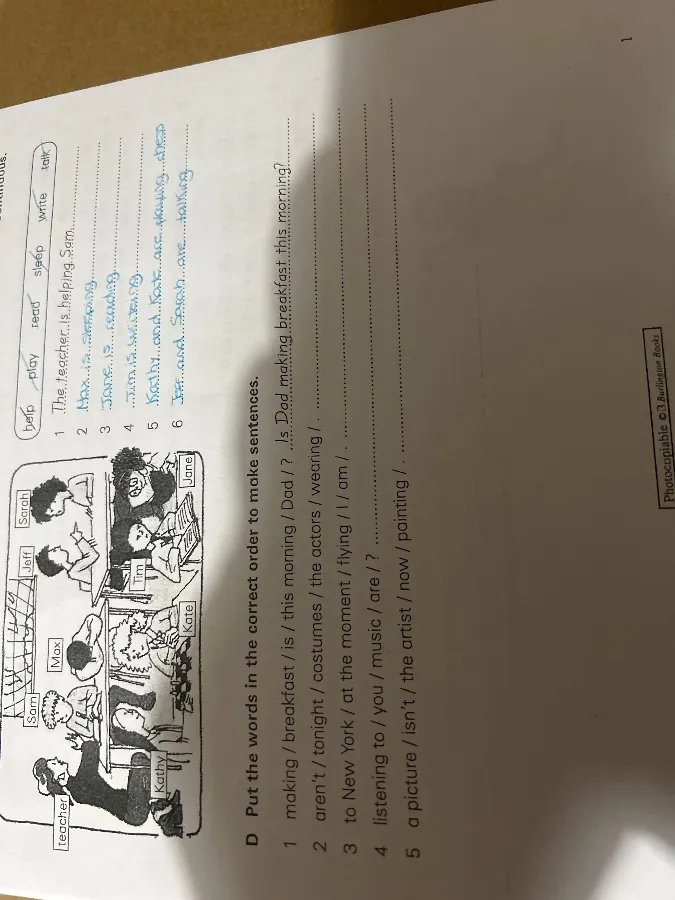
Задание D (продолжение 2)
-
making / breakfast / is / this / morning / Dad /?
Is Dad making breakfast this morning?
2. aren't / tonight / costumes / the actors / wearing /.The actors aren't wearing costumes tonight.
3. to New York / music / are / listening / you /?Are you listening to music to New York?
4. a picture / isn't / the artist / now / painting /.The artist isn't painting a picture now.
 Homi
Homi
Ассистент: ¡Hola! Claro, vamos a continuar resolviendo los ejercicios de la imagen paso a paso.
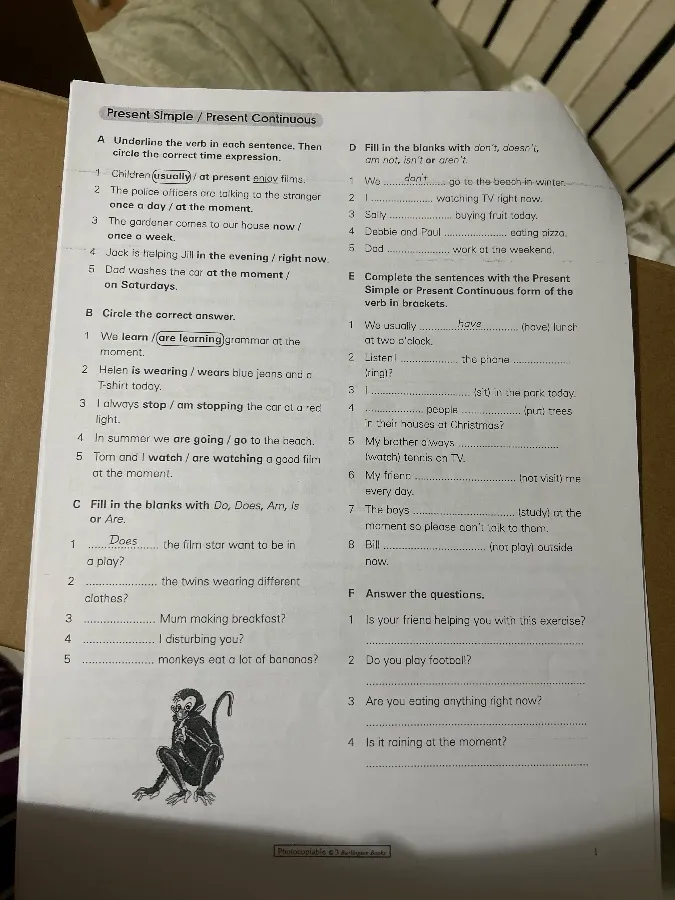
Задание E
Completa las oraciones con la forma Present Simple o Present Continuous del verbo entre paréntesis.
- We usually have (have) lunch at two o'clock.
- Listen! The plane is flying (fly)
- I am sitting (sit) in the park today.
- Many people paint (paint) trees for Christmas?
- My brother always watches (watch) tennis on TV.
- My friend doesn't visit (not visit) me every day.
- The boys are studying (study) at the moment so please don't talk to them.
- Bill is not playing (not play) outside now.
Задание F
Answer the questions.
-
Is your friend helping you with this exercise?
Yes, he is. (o No, he isn't.)
2. Do you play football?Yes, I do. (o No, I don't.)
3. Are you eating anything right now?No, I am not. (o Yes, I am.)
4. Is it raining at the moment?No, it isn't. (o Yes, it is.)
Homi