
I really liked the text-on-photo editor — the result turned out to be an absolute masterpiece.
Watermark Remover
No need to wait for this to finish — you can start a new generation right away.

Examples of created images


Related Tools
Remove Watermark from Photo Online Free
Free AI watermark remover — erase watermarks, logos and stamps from photos online instantly. No registration. Remove watermark from image in seconds.
What This AI Watermark Remover Can Do
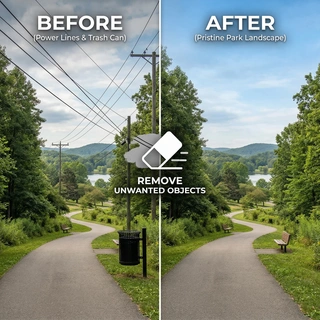
- Remove Watermarks from Photos — Upload any image and the AI automatically detects and erases the watermark — whether it's a text overlay, semi-transparent logo, or branded stamp. The area beneath is reconstructed intelligently so the photo looks natural and clean.
- Erase Logos and Brand Stamps — Remove logos, copyright symbols, brand identifiers and photographer stamps from images. The AI fills the erased area by analysing surrounding pixels, matching texture, color and lighting for a seamless result.
- Work with Photos, JPEGs and PNGs — Upload images in JPG or PNG format — the watermark remover handles both equally well. Transparent watermarks, semi-opaque overlays and solid-color stamps are all supported.
- No Blur, No Pixelation — Unlike simple cropping or blurring, this tool reconstructs the image under the watermark. The result is a clean photo with no blurring, smudging or pixelation where the watermark was.
- Instant and Free — No Registration Required — New users get free starting credits to remove watermarks right away. No account creation required to try the tool. Upload, process and download your clean image in seconds.
How to Remove a Watermark from a Photo
- Upload the photo — click the upload button or drag your image onto the page.
- Submit the image — the AI automatically detects the watermark and processes the photo.
- Download the result — get your clean, watermark-free photo ready to use.
How AI Watermark Removal Works
Traditional watermark removal in Photoshop requires manually masking the watermark area, then using the clone stamp or content-aware fill to reconstruct the image beneath — a process that takes skill and time. This AI watermark remover automates the entire workflow. The model analyses the image to locate the watermark, then uses inpainting to reconstruct the hidden content, matching surrounding texture, color gradients and light direction. The result looks like the watermark was never there. This makes it ideal for photographers editing preview images, content creators working with licensed photos, designers cleaning up reference materials, or anyone who needs a quick and clean watermark erase without editing software.
When to Use a Watermark Remover
- Preview photos from stock agencies — Got a preview image with a stock agency watermark? Use the tool to see how the clean photo will look before purchasing the license.
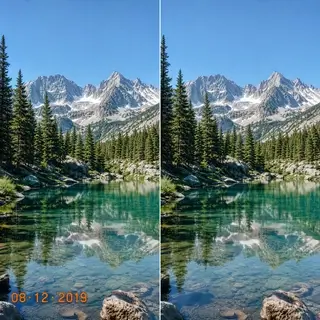
- Old photos with timestamps or date stamps — Older digital cameras often burned timestamps directly into the photo. Remove these date stamps cleanly without destroying the image.
- Screenshots with app logos or UI overlays — Screenshots from apps, video players or editing tools often include interface logos and watermarks. Strip them out for a clean presentation.
- Photos with photographer branding — Photos shared online with a photographer's signature or watermark overlay can be cleaned up using the AI tool — useful when you own the rights but need a clean copy.
Frequently Asked Questions
Is this watermark remover free?
Yes. New users receive free starting credits that can be used immediately to remove watermarks from photos. No registration or payment is required to try the tool.
How does the AI remove watermarks without blurring?
The AI uses inpainting technology — it analyses the image around the watermark area, reconstructs the likely content beneath using texture and color matching, and fills the area seamlessly. This produces a clean result rather than a blurred or smudged patch.
What types of watermarks can be removed?
The tool handles text watermarks, semi-transparent logo overlays, solid-color stamps, photographer signatures, date/time stamps and brand icons. Both light and dark watermarks on any background are supported.
What image formats are supported?
You can upload JPG and PNG images. The watermark remover works equally well on both formats, including PNG images with transparent backgrounds.
Does it work on images with watermarks in the corners?
Yes. Watermarks in corners, edges or overlaid across the center of the image are all detected and removed. Corner placement is actually the easiest for the AI since there is more surrounding context to reconstruct the background.
Can I remove a logo from a photo online for free?
Yes. The tool removes logos, icons and brand marks from photos online. Upload the photo, and the AI identifies and erases the logo, reconstructing the image beneath automatically.
See Also
- Remove text from photo online
- Remove unwanted objects from photo
- AI photo editor — edit photos with neural network
- All AI Image Tools
★★★★★
4.92
18,437 ratings
User #4383661
Thank you, the AI's work really impressed me. Perfect!
Web · May 2026
User #4279467
I really like it — would be great to have a few more free tries.
Google Play · May 2026
User #4160129
A wonderful app with affordable prices.
Web · May 2026

To keep generation costs low, we automatically delete old content. Make sure to save your generated content to avoid losing it
Get Prime status to store content without limits

Text copied
Done
Error