Unscramble Sports Words: English Vocabulary Exercise
 Homi
Homi
Привет! Сейчас помогу разобраться с этими заданиями.
Задание 2a
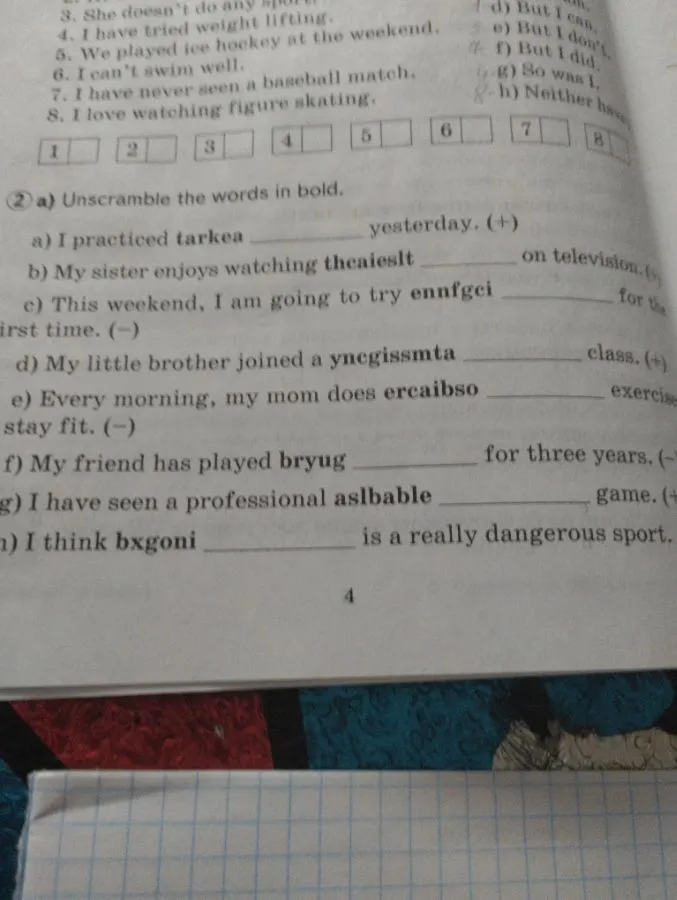
Здесь нужно расшифровать выделенные слова.
a) tarkea нужно преобразовать в слово, которое подходит по смыслу к предложению "I practiced ... yesterday". Очевидно, что это слово karate.
Решение:
I practiced karate yesterday.
b) theaieslt нужно преобразовать в слово, которое подходит по смыслу к предложению "My sister enjoys watching ... on television". Это слово athletes.
Решение:
My sister enjoys watching athletes on television.
c) ennfgci нужно преобразовать в слово, которое подходит по смыслу к предложению "This weekend, I am going to try ... for the first time". Это слово fencing.
Решение:
This weekend, I am going to try fencing for the first time.
d) ynegissmta нужно преобразовать в слово, которое подходит по смыслу к предложению "My little brother joined a ... class". Это слово gymnastics.
Решение:
My little brother joined a gymnastics class.
e) ercaibso нужно преобразовать в слово, которое подходит по смыслу к предложению "Every morning, my mom does ... exercise to stay fit". Это слово aerobics.
Решение:
Every morning, my mom does aerobics exercise to stay fit.
f) bryug нужно преобразовать в слово, которое подходит по смыслу к предложению "My friend has played ... for three years". Это слово rugby.
Решение:
My friend has played rugby for three years.
g) aslbable нужно преобразовать в слово, которое подходит по смыслу к предложению "I have seen a professional ... game". Это слово baseball.
Решение:
I have seen a professional baseball game.
h) bxgoni нужно преобразовать в слово, которое подходит по смыслу к предложению "I think ... is a really dangerous sport". Это слово boxing.
Решение:
I think boxing is a really dangerous sport.
Homi